 Intuit has enhanced its Shopify Connector for QuickBooks Online, offering merchants a more streamlined way to manage accounting by automatically importing sales transactions, refunds, fees and payouts from Shopify into QuickBooks Online. The update is designed to reduce manual bookkeeping and improve the accuracy of financial records and bank reconciliations.
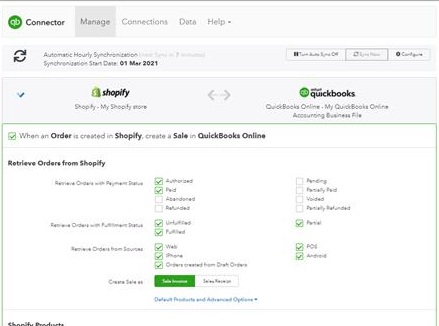
 The integration allows Shopify merchants to connect their stores directly to QuickBooks Online and automatically sync transaction data, including customer information, product details and inventory tracking. Users can also customize settings such as the date from which transactions are imported, deposit and payment accounts, and whether transactions should post automatically or be reviewed before being recorded. Initial data imports can take between 10 minutes and three hours, depending on transaction volume.
Once transactions are imported, they are organized into review categories that allow businesses to verify information before it is entered into their accounting records. After approval, QuickBooks creates the appropriate accounting entries, including sales receipts, invoices, expenses, deposits and payment records.

The connector also aims to simplify payout reconciliation by linking Shopify sales, refunds and processing fees to payout deposits. According to Intuit, this feature helps merchants match bank deposits more efficiently while reducing duplicate entries and reconciliation errors.
In addition to transaction management, the integration automatically records taxes collected through Shopify, including marketplace taxes withheld before merchant payouts. The system posts these amounts to the appropriate sales tax liability accounts, helping businesses maintain accurate tax records.
 For merchants using Shopify’s business-to-business platform, the connector supports invoice synchronization, customer information, payment terms and payment status updates between Shopify and QuickBooks Online. If a B2B invoice is marked as paid in QuickBooks, the payment status can be synchronized back to Shopify, ensuring both platforms remain aligned.
The Shopify Connector is available through QuickBooks Online and is included with a QuickBooks subscription. Merchants can disconnect the integration or modify its settings through the QuickBooks integrations dashboard as their business needs change.
Give us a call or email us for more information on how to connect your QuickBooks Online to your Shopify account today!